Announcing a Death on WhatsApp: Sample Messages, Etiquette and Sharing the Obituary
After a death, many people need to be told, and WhatsApp is often the quickest way to reach them. Here you will learn who to call first, what belongs in the message and how to share all the details with a single link. With sample messages for friends, neighbors, colleagues and clubs, and a few in German.
Is it acceptable to announce a death on WhatsApp?
Yes. For friends, acquaintances, neighbors, colleagues and clubs, a WhatsApp message is now a common way to share the news of a death, and often the quickest. Many people even find it considerate: they can read the message when they are ready and reply in their own time.
Call first, then write
Close family, very good friends and older people should hear the news in person or by phone. Only send messages to the wider circle once these people know. Otherwise they may find out from a forwarded message.
You don’t have to tell everyone yourself. Ask one person from your circle of friends, the club or the workplace to pass the news on to the others. What else needs to be done in the first days is covered in our checklist after a death.
What to include in the message
- Who has died, with their full name, and when. Not everyone knows the person by the same first name.
- How, if you wish, in a few words: “after a short, serious illness”, “suddenly and unexpectedly” or “peacefully”.
- The funeral or burial: date, time and place, or “details to follow” or “in the immediate family only”.
- The family’s wishes, such as a donation instead of flowers, or visits only after the funeral.
- The link to the online obituary, if you have one. All the details are in one place there.
A message to many people is not the place for details about the cause of death, voice messages, emojis or stickers. Don’t include the home address either: messages get forwarded, and fraudsters deliberately take advantage of deaths, for example when they know the home will be empty during the funeral. Read more in our guide on fraud after a bereavement.
Sample messages for WhatsApp
Adjust the names, relationships and dates. [Link] stands for the link to your online obituary. If you don’t have one, leave out the sentence with the link: the messages contain all the important details without it.
To close friends
Dear [Name], I have sad news: my mother died last night. It was quick in the end, and she was not in pain. I wanted you to hear it from me. I’ll be in touch as soon as I can breathe a little again.
Dear [Name], Dad passed away peacefully early this morning. We are very sad, but also grateful that we could be with him. The funeral service is on [date] at [time] in [place]. You can find the obituary here: [Link]
To acquaintances and neighbors
Dear [Last name] family, we would like to let you know that [First name Last name] died on [date]. The funeral service will be held on [date] at [time] in [place]. You can find the obituary here: [Link]. Kind regards, [Your name]
Hello everyone, we are sorry to tell you that our father [First name Last name] died on Sunday. If you would like to say goodbye: the funeral service is on [date] at [time] in [place]. The obituary with all the details: [Link]
To your employer and team
Dear Ms. [Last name], my father died yesterday. I won’t be able to work for the next few days and will get back to you on [day] about how things will go from here. Thank you for your understanding. [Your name]
Dear team, it is with great sadness that we let you know that our colleague [First name Last name] died on [date]. The funeral service is on [date] at [time] in [place]. If you would like to attend, please let [Name] know. The family has published an obituary with a condolence book: [Link]
In a club or group
Dear members, we mourn the loss of [First name Last name], who was part of our club for [number] years. The funeral service is on [date] at [time] in [place]. If you would like to offer the family your condolences, you can sign the condolence book: [Link]
When the burial is private
Our mother [First name Last name] died on [date] at the age of [age]. The burial will take place in the immediate family only. If you would like to remember her, you can find her obituary here: [Link]
When the date is not yet set
It is with great sadness that we let you know that [First name Last name] died today. We will share the date of the funeral service as soon as it is set. It will also appear in the obituary: [Link]
After a sudden death or an accident
We have terrible news to share: [First name] was killed in an accident on [day]. We still can’t believe it. Please understand if we don’t get in touch for a few days. We will send the details of the funeral service as soon as we have them.
After a suicide
You don’t have to say how someone died. “Suddenly and unexpectedly” is enough, and nobody is entitled to more. If you want to be open about it, that is fine too: some families find it a relief not to have to avoid the subject. In that case, write “took their own life” rather than “committed suicide”.
Our son [First name] died suddenly and unexpectedly on [date]. We are devastated. Please forgive us if we can’t reply right now. The funeral service is on [date] at [time] in [place].
After the death of a child
It’s fine to say what you need right now and what you don’t. It takes away other people’s uncertainty about how to get in touch.
Our daughter [First name] died on [date]. She was only [age] years old. We are heartbroken. We can’t talk on the phone at the moment, but we read every message. The burial will take place in the immediate family only.
In German: messages for German-speaking contacts
If you live in Germany, neighbors, colleagues or club members may not speak English. These three messages are in German, with their meaning below. Germans usually use the formal “Sie” with neighbors and managers, and the informal “Ihr” or “Du” within a team or club.
To neighbors
Liebe Familie [Nachname], wir möchten Ihnen mitteilen, dass [Vorname Nachname] am [Datum] gestorben ist. Die Trauerfeier findet am [Datum] um [Uhrzeit] in [Ort] statt. Die Traueranzeige finden Sie hier: [Link]. Herzliche Grüße, [Ihr Name]
“Dear [Last name] family, we would like to let you know that [First name Last name] died on [date]. The funeral service will be held on [date] at [time] in [place]. You can find the obituary here: [Link]. Kind regards, [Your name]”
To your manager
Guten Tag Frau [Nachname], mein Vater ist gestern gestorben. Ich kann in den nächsten Tagen nicht arbeiten und melde mich am [Tag], wie es weitergeht. Danke für Ihr Verständnis. [Ihr Name]
“Dear Ms. [Last name], my father died yesterday. I won’t be able to work for the next few days and will get back to you on [day] about how things will go from here. Thank you for your understanding. [Your name]”
To a club or group
Hallo zusammen, leider müssen wir Euch mitteilen, dass [Vorname Nachname] am [Datum] gestorben ist. Die Trauerfeier ist am [Datum] um [Uhrzeit] in [Ort]. Die Anzeige mit allen Angaben: [Link]
“Hello everyone, we are sorry to tell you that [First name Last name] died on [date]. The funeral service is on [date] at [time] in [place]. The obituary with all the details: [Link]”
Group chat or individual messages?
- Individual messages for the people close to you. They are more personal, and the reply comes only to you.
- A broadcast list for many recipients: everyone receives the message individually, and replies come only to you. However, it only reaches people who have saved your number.
- Existing groups such as family, club or neighborhood: a message there is fine. Expect many people to reply with their condolences in the group. Don’t start a new group just for this message.
And all the replies?
You don’t have to reply to everyone, and certainly not right away. If you like, a short message to everyone later is enough:
Thank you for your kind words and thoughts. They have been a great support to us. I can’t reply to everyone individually right now, but I have read everything.
After the funeral, many families say thank you with a thank-you note. You can find examples in our guide on writing a thank-you note after a death.
Sharing the obituary on WhatsApp
A message gets forwarded, shortened and retyped, and every time it is passed on, a mistake can creep in. With an online obituary, you send a link instead: everyone sees the same details, condolences are collected in the condolence book, and a correction appears for everyone under the same link. Recipients need neither an app nor an account.
Before you publish the obituary, you can use Send preview to relatives in step 2 to send the draft via WhatsApp, email or text message. Siblings and other relatives can then check names, dates and spellings before the obituary goes out to everyone. The preview link is valid for four days and is not public.
As a link
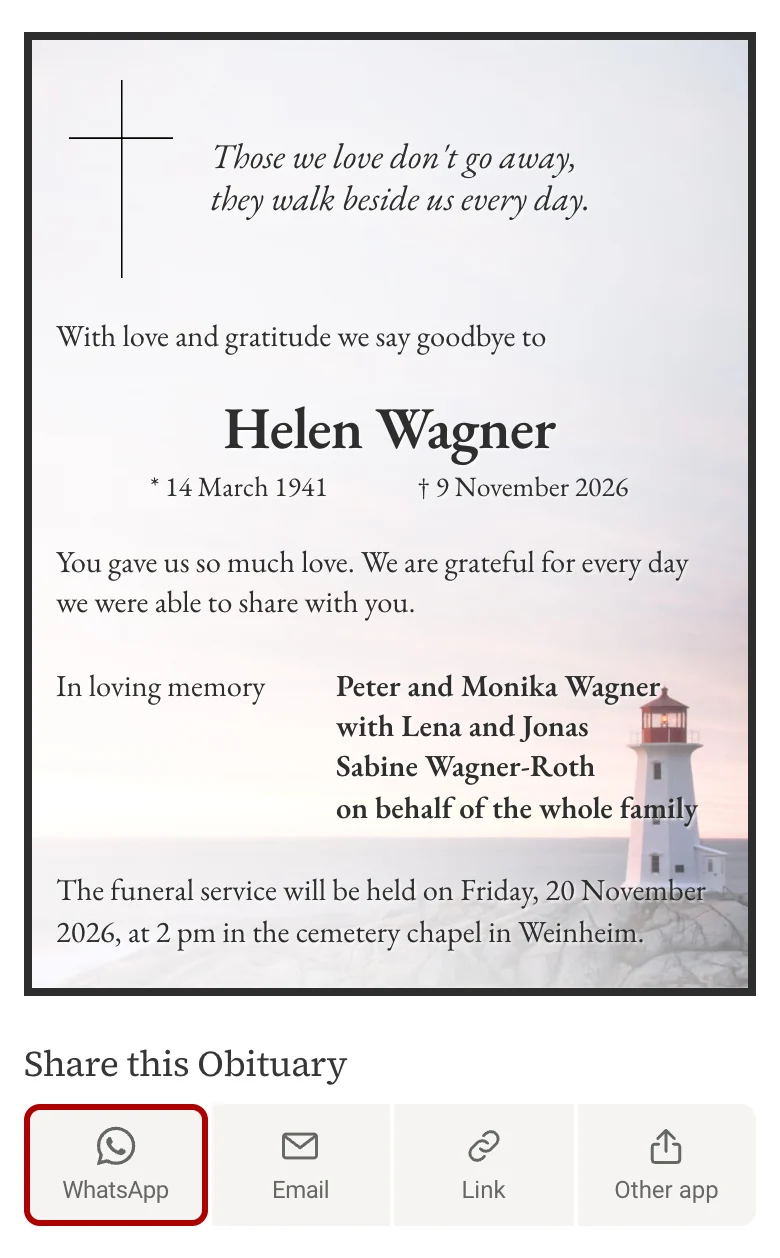
Below the obituary you will find “Share this Obituary”. Tap WhatsApp: WhatsApp opens with the name and the link to the obituary. Choose a contact or group and add a personal sentence if you like. A preview image of the obituary appears in the chat.
Link copies the address, for example for Signal, Threema or a text message. On a smartphone, Other app opens your phone’s share menu.
As an image
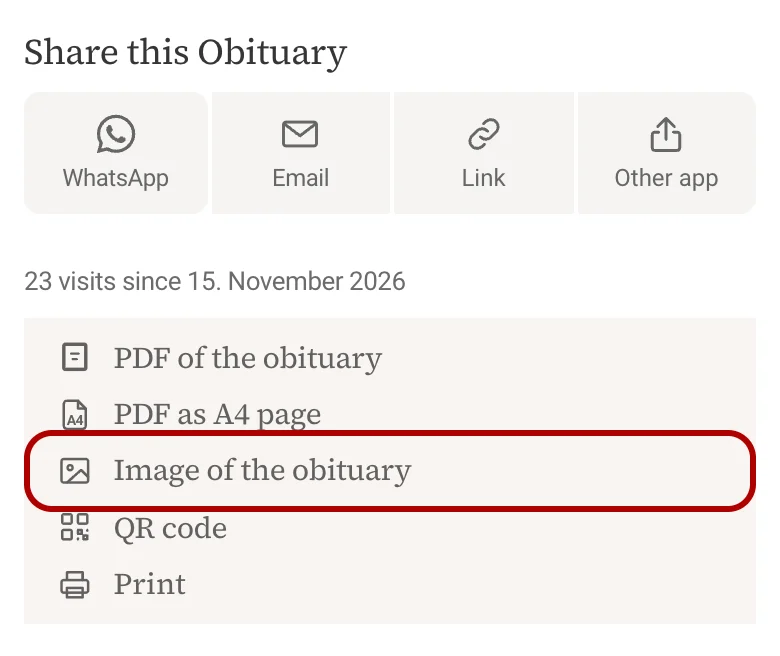
Some people prefer to see the obituary right in the chat without opening a link, especially older people. Under Image of the obituary you will find three versions:
- The notice only: the obituary on its own, for example for printing.
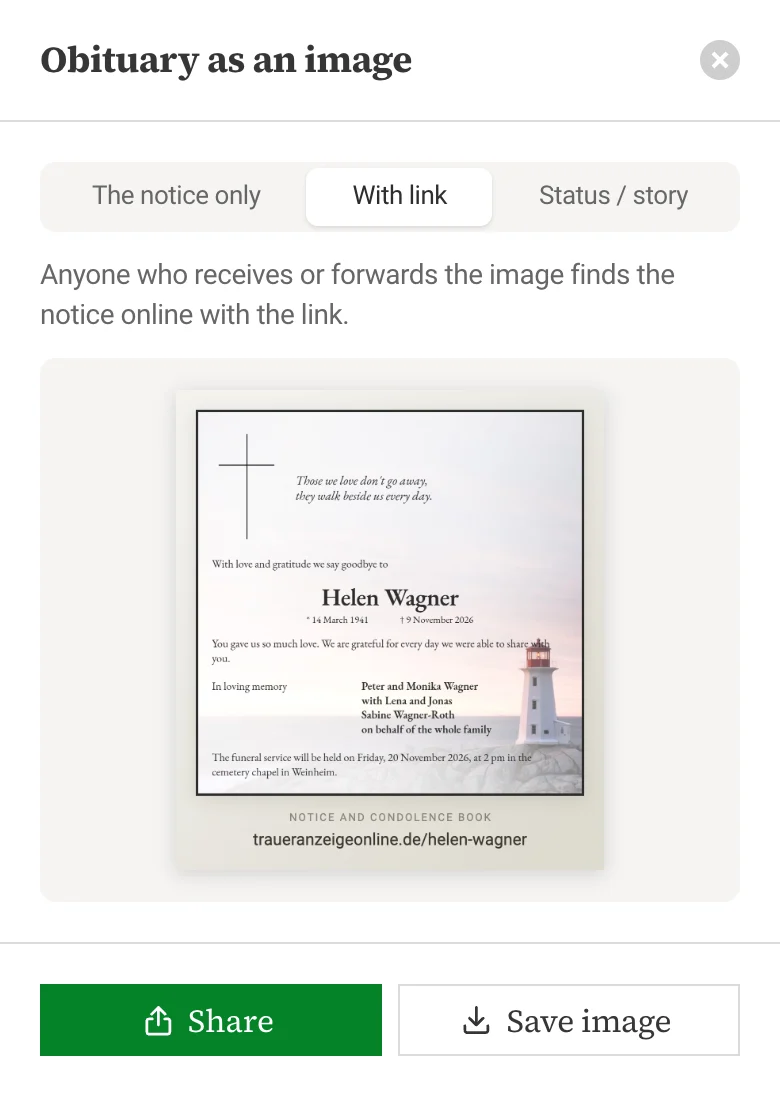
- With link: the obituary with the short address below it. Anyone who receives the image, even forwarded, can find the obituary and the condolence book.
- Status / story: in portrait format for a WhatsApp status or an Instagram story.
On a smartphone, Share opens the share menu with the image right away; on a computer, Save image downloads it. Add the link to the image caption as well: there it can be tapped.
An image you have sent stays as it is. If something changes afterwards, such as the date of the funeral service, only those who open the link will see it. That is why “With link” puts the link right below the obituary.
The obituary in your WhatsApp status
In your status, your contacts see the obituary for 24 hours, including people you would not message individually: former colleagues, old school friends, other parents from the kindergarten. Who sees it depends on your privacy settings in WhatsApp.
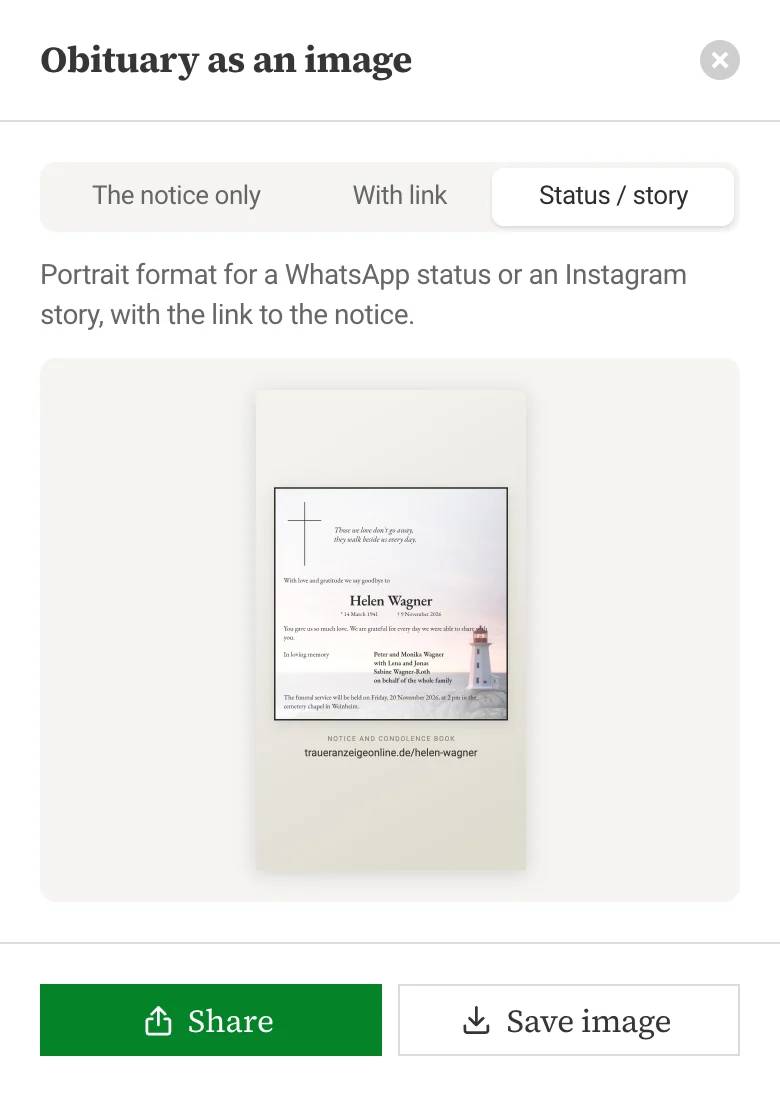
- Open Image of the obituary and choose Status / story.
- Tap Share, choose WhatsApp and then “My status”. Or save the image and add it as a status under “Updates” in WhatsApp.
- Add the link to the obituary as text so your contacts can tap it.
After 24 hours, the status disappears on its own. The obituary remains available under its link.
Frequently asked questions
Is it disrespectful to announce a death on WhatsApp?
No. For the wider circle, a message is common today. Close family and friends should hear the news in person or by phone first, though.
When should I send the message?
As soon as the closest relatives know, preferably during the day. If the date and place of the funeral service are not yet set, write “details to follow” and send them later, or share the link to the obituary once it is ready.
Can I still change the obituary after sharing the link?
Yes. Send us the change by email and we will update the obituary free of charge. The link stays the same, and anyone who opens it sees the new version right away. Images of the obituary that have already been sent do not change.
Do recipients need an app or an account?
No. The obituary opens in the browser, on a smartphone as well as on a computer. To sign the condolence book, a name and an email address are enough.
Can I share the obituary with certain people only?
Yes. With the “Private” option, the obituary does not appear in our directory. You receive a private link that only the people you send it to can see.
How should I reply if I receive a message like this myself?
One or two sincere sentences are enough, and make it clear that no reply is needed. You can find examples for WhatsApp, text messages and the condolence book in our guide on expressing condolences.
How do I share the obituary by email or text message?
Below the obituary, Email opens your email program with the link. For a text message, copy the link with Link or choose Other app on your smartphone.
Create an obituary online
Designed in a few minutes, with a condolence book. Share it on WhatsApp as a link or image. €35, one-time.
Design an obituary